Elevate Your iPad Art with Paper Texture Brush Procreate Add on
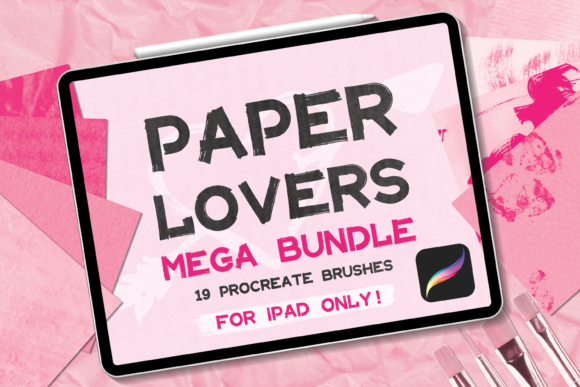
There is a specific kind of magic in digital art that tries to emulate the tangible world. We spend hours trying to capture the grain of a canvas or the tooth of cold-pressed paper within the sterile environment of a screen. If you have ever found yourself layering noise filters or manually shading edges to get that authentic feel, the Paper Texture Brush Procreate Add on is designed to streamline that workflow. This isn't just a random collection of strokes; it is a curated library of 19 distinct brushes engineered to bring the warmth and imperfection of physical paper into your digital illustrations.
The core appeal of this bundle lies in its variety and tactile realism. It moves beyond generic noise and offers specific visual personalities, ranging from the subtle aging of stained paper to the complex shadows of wrinkled paper. For designers and artists who value depth, this add-on allows you to build layers of history onto your canvas. You can mix the gritty feel of a paint paper texture with the smooth finish of a standard paper brush to create complex, multi-dimensional backgrounds. This versatility makes the Paper Texture Brush Procreate Add on a staple for anyone looking to add character to their digital portfolio.
Practical Applications for Modern Creatives
Understanding the tool is one thing; knowing how to deploy it effectively is where the real value lies. The visual characteristics of these brushes—specifically the organic irregularities they introduce—are incredibly useful across various sectors of the creative industry. Here is how different professionals can leverage this bundle:
- Brand Identity and Packaging: If you are crafting a brand identity for an artisanal coffee shop, a vintage clothing line, or an organic skincare company, the "Special Paper" brushes are invaluable. They allow you to mock up packaging designs that feel tactile and authentic before a single physical sample is printed. The texture communicates a sense of "handmade" quality that modern consumers crave.
- Editorial and Publishing Design: For bloggers and publishers, background textures often make or break the readability of a layout. Using a subtle "Stained Paper" brush as a background layer can add a vintage, scholarly vibe to digital magazines or book covers without overpowering the typography. It helps in establishing a visual hierarchy where the text floats comfortably above the texture.
- Web and UI Design: Flat design has its place, but textured web design is making a comeback. By utilizing the Paper Texture Brush Procreate Add on, web designers can create hero images, custom cursors, or section dividers that break the monotony of solid color blocks. It adds a human touch to digital interfaces, making the user experience feel warmer and more approachable.
- Print-on-Demand and Merchandise: The commercial utility of this bundle extends to physical products. You can create intricate, textured backgrounds for birthday cards, wedding invitations, or even all-over prints for t-shirts. The high-resolution nature of the brushes ensures that your designs remain crisp and professional when transferred to physical objects like mugs or notebooks.
Integrating Texture into Your Design Workflow
One of the standout features of the Paper Texture Brush Procreate Add on is the delivery method. Receiving a single .BRUSHSET file containing all 19 tools means you avoid the tedious process of installing brushes one by one. This efficiency is crucial for maintaining a smooth creative flow. Once imported, you have immediate access to a spectrum of textures that can influence the mood of your entire project.
When selecting a specific brush from the bundle, consider the emotional resonance of your project. For instance, the Wrinkled Paper brushes evoke a sense of age, nostalgia, or perhaps a chaotic brainstorming session. They work best for projects related to history, storytelling, or raw emotion. Conversely, the standard Paper Brushes offer a cleaner grain, suitable for professional presentations or clean illustration styles where you only want a hint of surface texture to prevent the artwork from looking too "digital."
It is also worth experimenting with layer modes. Placing a "Paint Paper" texture on a layer set to Multiply or Overlay can instantly unify disparate elements in an illustration, creating a cohesive look that mimics traditional mixed media. This technique is particularly effective for social media graphics where you need to grab attention quickly; the texture adds a level of professionalism and depth that flat colors cannot achieve.
Maximizing Value and Compatibility
Before diving into a new project, it is essential to ensure your setup is compatible. As noted, this bundle is exclusive to the Procreate app on iPad. It is a specialized toolset for a specific ecosystem, ensuring that the brushes are optimized for the Apple Pencil’s pressure sensitivity and tilt functionality. This optimization is what allows for the nuanced application of texture—pressing harder might spread the texture or increase opacity, mimicking the feel of actual charcoal or pastel on rough paper.
For those concerned about commercial licensing and usage, these assets are designed to be integrated into your work. Whether you are a freelancer designing for a client or a small business owner creating internal marketing materials, the textures are there to be used. However, always review the specific license terms provided by the creator to ensure your usage aligns with the permitted scope, especially regarding resale of the raw files.
Ultimately, the Paper Texture Brush Procreate Add on serves as a bridge between the convenience of digital art and the soul of traditional mediums. By incorporating these 19 brushes into your toolkit, you gain the ability to add depth, history, and personality to your work with a single swipe. It is an investment in the visual quality of your brand and the tactile experience of your audience.